Ask for text, a yes/no answer, or contact details
Three question types collect an answer directly rather than a pick from a list: text input, yes/no (both free), and contact info (Pro).
Text input
A single line of free text — there's no multi-line or paragraph variant.
| Setting | What it does | Default | Limits | Edition |
|---|---|---|---|---|
| Placeholder text | Hint text shown in the empty field | Empty | No length limit found | Free & Pro |
What respondents see: a single-line text field. There's no character limit on what they type.
Yes/No
Two fixed answer options, Yes and No by default. You can edit either option's text, but you can't add a third or remove one, and the question is always single-choice.
| Setting | What it does | Default | Limits | Edition |
|---|---|---|---|---|
| Answer options | Text for each of the two options | "Yes" and "No" | Fixed at two; can't add or delete one | Free & Pro |
| Randomize Order | Swaps which option shows first, per respondent | Off | — | Free & Pro |
What respondents see: two options as radio buttons — Yes and No unless you've edited the text.
Contact info
Contact info needs an active Pro licence. See pricing.
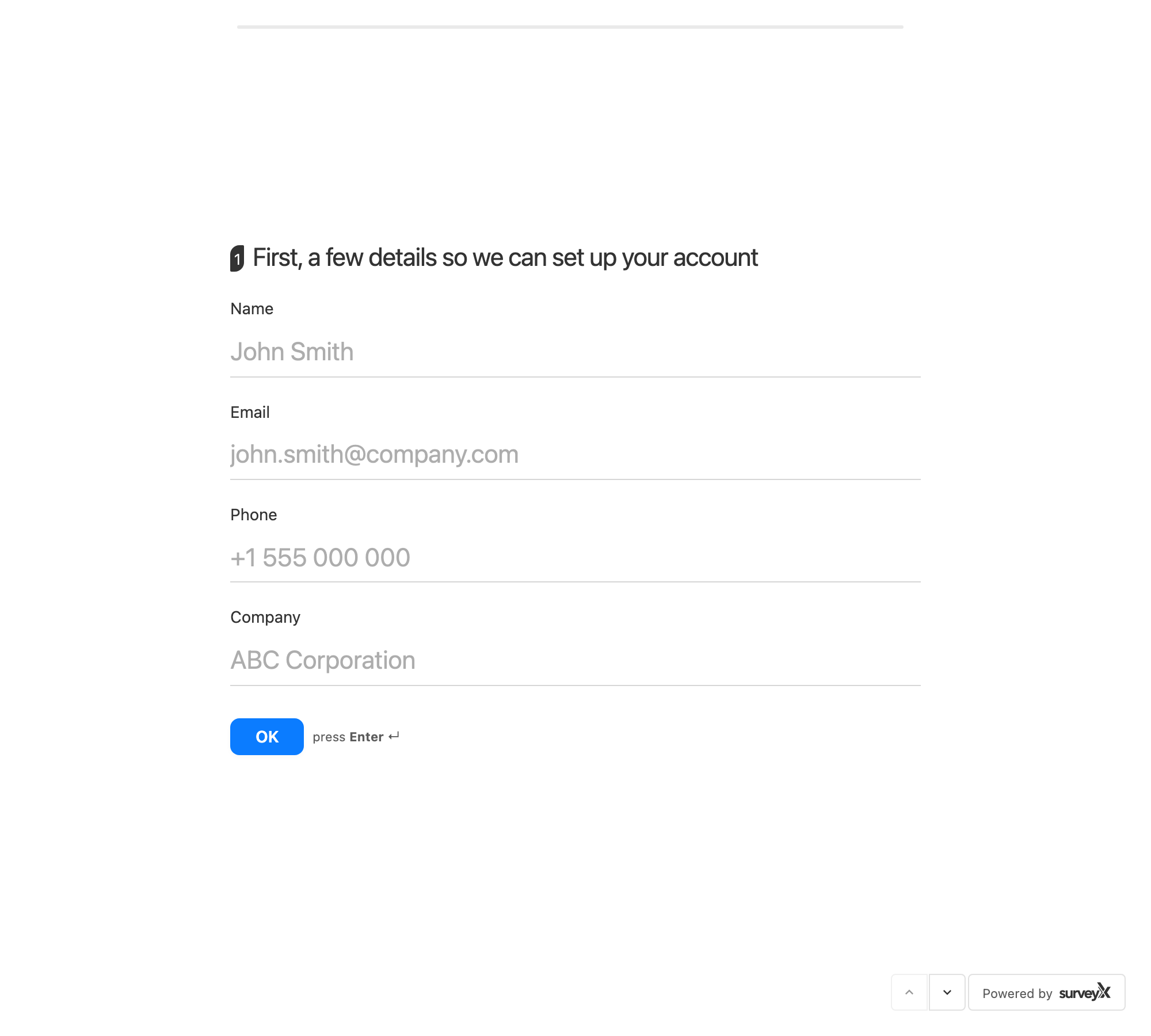
Contact info is the only question type that builds a respondent profile — name, email, phone, and company. There's no separate "respondent fields" feature elsewhere in SurveyX; whatever this question collects is the whole profile.
Each of the four fields is switched on and made required independently, and each can show or hide its own label:
| Setting | What it does | Default | Limits | Edition |
|---|---|---|---|---|
| Name — enabled | Shows the name field | On | — | Pro |
| Name — required | Blocks submission without a name | Off | — | Pro |
| Email — enabled | Shows the email field | On | — | Pro |
| Email — required | Blocks submission without an email | Off | Checked against a valid email format when filled in | Pro |
| Phone — enabled | Shows the phone field | On | — | Pro |
| Phone — required | Blocks submission without a phone number | Off | No format check | Pro |
| Company — enabled | Shows the company field | Off | — | Pro |
| Company — required | Blocks submission without a company name | Off | — | Pro |
| Show label | Shows the field's label above it | Off, per field | — | Pro |
Because contact info has no single Required toggle of its own, the question counts as required whenever at least one of its fields is set to required.
If you turn a field off, SurveyX drops anything a respondent had typed into it before saving — a disabled field never reaches the stored response.
What respondents see: up to four fields — name, email, phone, company — in whatever combination you've enabled, each with a label if you've turned that on.
Troubleshooting
Text input has no character limit. By design — a respondent can type as much as they like.
Yes/No only ever shows two options. By design — you can't add a third answer option.
I turned on Required for contact info, but there's no single Required switch. Turn on Required for each field that must be filled in; the question becomes required once any field is.
I disabled a contact-info field, but I'm worried a respondent's answer to it is still stored. It isn't — SurveyX strips any value posted for a disabled field before saving the response.