Recall an earlier answer with @
Answer recall inserts a respondent's own earlier answer back into later text — a question title,
a description, or a closing or result screen. Type @, pick an earlier question, and that
respondent's answer to it appears wherever you placed the mention.
Answer recall does not exist in the free plugin at all — there's no upgrade stub, the feature itself is absent. See pricing →
Steps
- Open a question's title or description, or a closing or result screen's title or description.
- Type
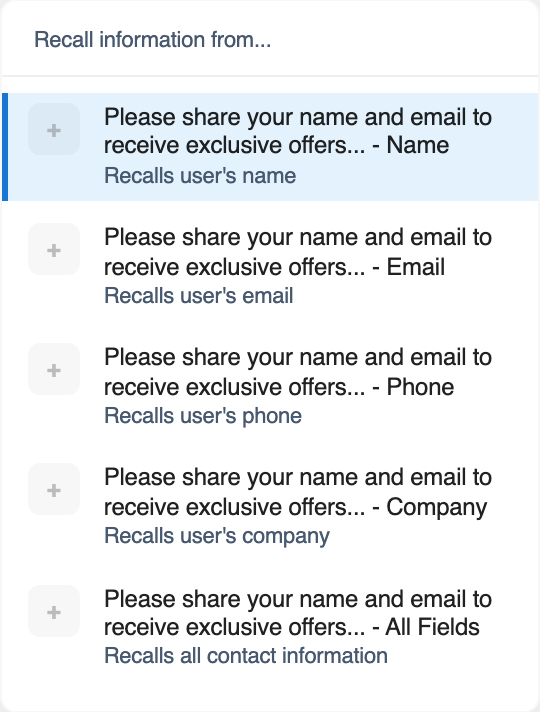
@to open the mention list. It offers every question that comes before this one — a question can only recall an answer given earlier in the survey. A closing or result screen can recall any question, since those only ever appear after all of them. - Pick a question from the list. For a Contact Info question, pick one of five sub-options instead: Name, Email, Phone, Company, or All Fields (which joins every filled field with commas).
Which question types can be recalled
| Can be recalled | Cannot be recalled |
|---|---|
| Text Input | Date |
| Contact Info (and its 5 sub-fields) | File Upload |
| Multiple choice, multi-select | Matrix / Likert |
| Image choice, multi-image choice | |
| Dropdown | |
| Yes/No | |
| Opinion Scale | |
| Rating |
Mentioning a Date, File Upload or Matrix / Likert question resolves to nothing. Stick to the types on the left when picking a mention.
The _____ fallback
If a respondent reaches a mention for a question they haven't answered yet — or skipped — the
mention is replaced with five underscores (_____) instead of leaving a blank gap.
Trivia score mentions work on both editions
Separately from answer recall, a Knowledge Quiz survey can use @score and @total in its
result screen to show the respondent's correct-answer count and the total number of questions.
This mention is available on free too — it isn't part of the Pro-only recall feature above.
Formatting carried through
A recalled multiple-choice, dropdown or image-choice answer keeps any formatting you gave that answer option (bold, links, and so on), because the option's own text is rich text. A recalled Text Input answer is inserted as plain text with any HTML characters escaped, since that's free-typed respondent input.
What respondents see
Wherever you placed a mention, respondents see their own earlier answer in its place, or
_____ if they haven't reached or answered that question yet. They never see the @ syntax
itself — that's only in the editor.