Send respondents to a different question with skip logic
Skip logic sends a respondent to a specific question, result screen or closing screen depending on which answer they picked. It gets you a survey where different answers lead down different paths, without writing any conditions.
On free, the Skip Logic section is an explainer with an upgrade link — no jump map to edit. See pricing →
What it actually is
Skip logic is a jump map, not a rule builder. There is no "if answer equals X" condition to write — you pick one answer, and pick where it goes. That is the whole feature:
- Every answer on an eligible question gets its own destination: a later question, a result screen, a closing screen, or "continue to next" (the default, meaning no jump).
- There's no separate condition to configure and nothing beyond picking the answer's destination — selecting the answer at runtime is what triggers the jump.
- A jump can only go forward: to a question after the current one, or to any result or closing screen. You cannot send a respondent backward.
Steps
- Open the survey's Editor tab, then the Skip Logic section. It is not available on Quick Vote surveys.
- For each answer on an eligible question, pick a destination from its dropdown: a later question, a result screen, or a closing screen. Leave it on "continue to next" if that answer shouldn't jump anywhere.
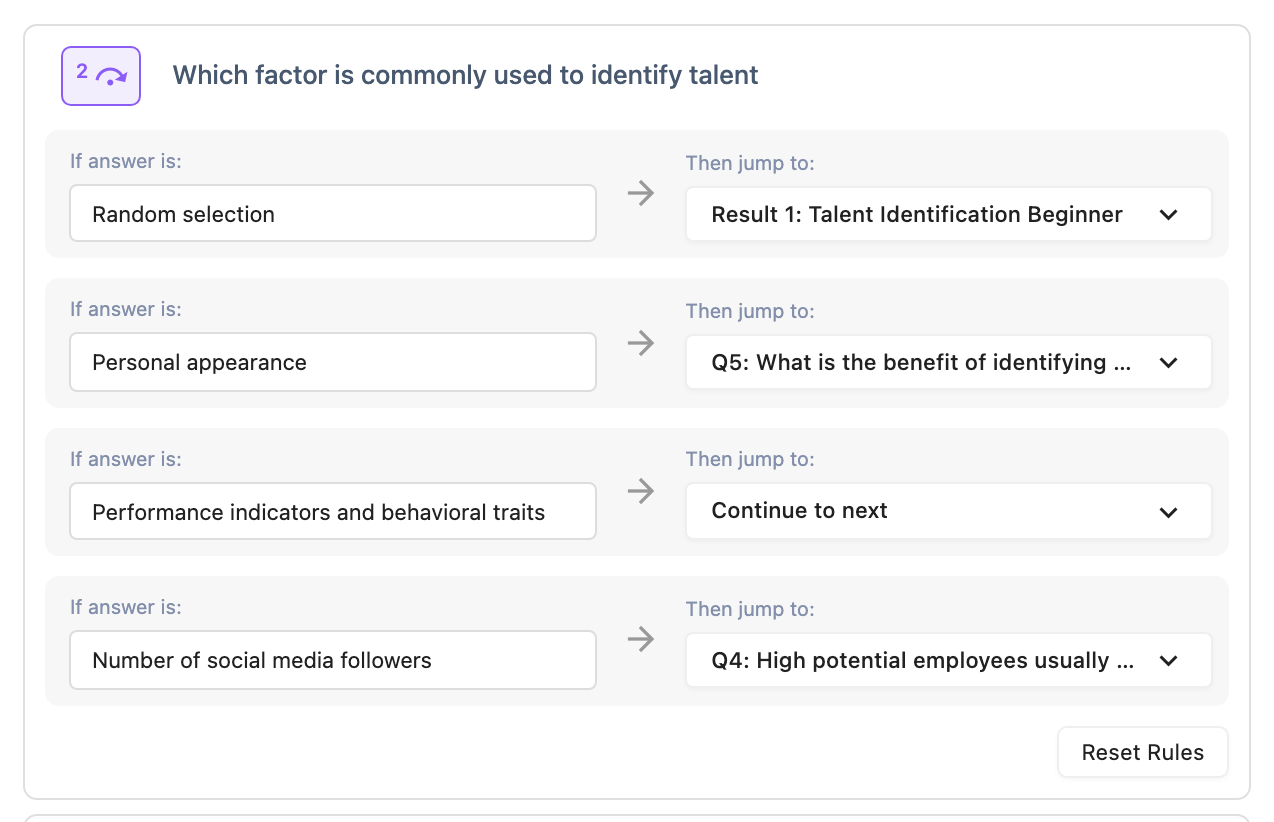
Which questions are eligible
Skip logic only works on questions with discrete, pickable answers — the answer itself is the condition, so a question type without a fixed set of answers has nothing to attach a jump to.
| Eligible | Not eligible |
|---|---|
| Multiple choice, multi-select | Text Input |
| Dropdown | Contact Info |
| Image choice, multi-image choice | Rating |
| Yes/No | Opinion Scale |
| Date | |
| File Upload | |
| Matrix / Likert |
What happens when the survey changes
Skip logic heals itself rather than breaking:
- A target is deleted: the question, result or closing screen a jump pointed to is gone, so that jump resets to "continue to next" automatically. This check runs every time you open the editor and every time you edit the survey's questions.
- An answer is deleted: the jump attached to it is removed along with it — there's nothing left to reset.
- A jump also resets if its target ends up at or before its own question after you reorder questions, since a jump can only go forward.
There's no separate limit on how many jumps you can set — every eligible answer can have one.
What respondents see
A respondent never sees the jump map. They answer as normal, and the survey moves to whatever question or screen you set for that answer — or the next question, if you left it on "continue to next".