Look up a survey's settings
A survey's General tab holds 18 settings that apply to that one survey: whether it's reachable, what a respondent can do while answering, what shows afterward, and how it's branded. This page groups them by what they control, with one anchor per group.
Looking for something that applies to every survey at once — spam protection, email notifications, Mailchimp — instead of just this one? See Global settings.
General tab settings write a few seconds after you stop changing them; there's no Save button on this screen. That's different from the Editor tab's content (title, cover, questions), which needs an explicit Save — see Get to know the survey editor.
A free survey's stored settings can hold a Pro-only value if something other than the General tab writes it — free's server blocks changes to a survey that already needs Pro for its questions, but it doesn't check most fields one by one. The one setting checked on the server regardless of what's stored is spam protection; see Spam protection.
Publishing state
These decide whether the survey is reachable at all, and how respondents reach it.
| Setting | What it does | Default | Limits | Edition |
|---|---|---|---|---|
| Survey Page URL Mode | Chooses how the survey is served: Default follows the site-wide Survey Page switch, Page always gives it its own URL, Shortcode serves it only through [surveyx id="…"] | Default | One of default, page, shortcode | Free+Pro |
| Allow Search Engines to Index the Survey Page | Lets the standalone survey page appear in search results | Off | On/off | Pro only — a free survey's page is always noindex,nofollow, regardless of this setting |
| Redirect After Submit | Sends a respondent straight to a URL instead of the closing screen | Empty (shows the closing screen) | Must be a valid http(s) URL; an invalid one is rejected and cleared on save. Doesn't fire when a result screen is due instead | Pro only |
Timing
| Setting | What it does | Default | Limits | Edition |
|---|---|---|---|---|
| Expiration Time | Closes the survey to new responses on a set date | None | Presets of 1 or 2 weeks, 1, 3 or 6 months, or 1 year; always ends at 23:59:59 that day | Pro — free shows the date field but never saves a value from it |
There's no start date to configure. A survey becomes reachable as soon as its status is Active; Expiration Time only controls when it stops.
Answering behaviour
These change what a respondent can do while answering, and who's allowed to start.
| Setting | What it does | Default | Limits | Edition |
|---|---|---|---|---|
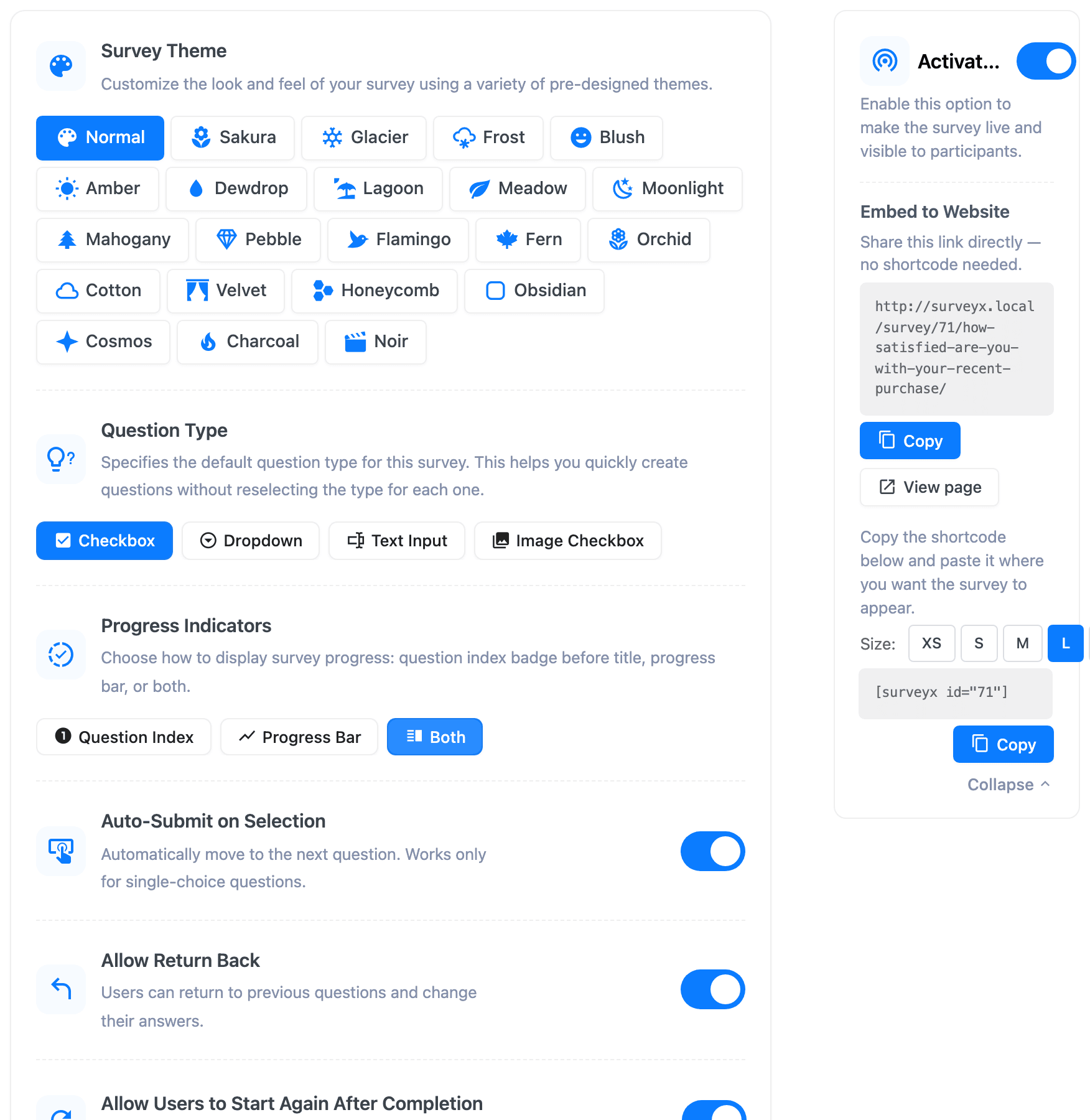
| Default Question Type | Sets which question type a new question opens with, in the Editor tab | Checkbox | 4 fixed types — Checkbox, Dropdown, Text Input, Image Checkbox — the same short list on both editions, not the full 13-type picker | Free: locked to Checkbox, other clicks route to the upgrade page · Pro: a working 4-item picker |
| Auto-Submit on Selection | Advances to the next question as soon as a respondent picks an answer | On | Works only on single-choice questions | Free+Pro |
| Login Required to Vote | Requires a signed-in WordPress user before someone can start answering | Off | On/off | Free+Pro |
| Allow Return Back | Lets a respondent go back and change an earlier answer | On for Survey, Knowledge Quiz and Personality Test; not offered on Quick Vote | On/off | Free: the stored setting is enforced, but the switch always shows off and can't be changed from the screen · Pro: a working toggle |
| Allow Users to Start Again After Completion | Adds a footer button that restarts the survey from the beginning | On | On/off | Pro only — free stores the setting but has no button anywhere in its front end to act on it |
| Allow Revote on Update | Clears every existing response when you edit the survey's questions or answers after it's live | Off | On/off; a confirmation dialog warns you before anything is cleared | Free+Pro |
Results visibility
Applies only to the two survey types that show something after the last question: Quick Vote and Knowledge Quiz.
| Setting | What it does | Default | Limits | Edition |
|---|---|---|---|---|
| Enable Vote Results Button | Lets respondents see the running vote tally after they vote | On | On/off | Free+Pro; Quick Vote only |
| Show Correct and Incorrect Answer Markers | Marks each answer right or wrong as the respondent answers it | Off | On/off | Free+Pro; Knowledge Quiz only |
| Include a Countdown Timer | Shows a countdown while the respondent answers | Off | On/off | Free+Pro; Knowledge Quiz only |
Appearance and branding
| Setting | What it does | Default | Limits | Edition |
|---|---|---|---|---|
| Survey Theme | Sets the color and layout theme applied to this survey | normal | 22 built-in themes, plus any custom Pro themes | Free: 6 themes (Normal, Sakura, Glacier, Frost, Blush, Amber) · Pro: all 22, plus custom themes |
| Top Navigation Bar | Chooses what shows at the top while answering: the question number, a progress bar, or both | Both | One of question_number, progress_bar, both | Free: locked to question number · Pro: all three; Survey, Knowledge Quiz and Personality Test only, not Quick Vote |
| Header Branding Logo | Shows a logo at the top of the survey | Off (free) / On (Pro), set at creation | On/off | Free: locked in the UI, and even switched on has nothing to show — free has no field to set the logo · Pro: a working toggle plus a logo upload |
| Footer Branding Logo | Shows the "Powered by SurveyX" credit at the bottom of the survey | On | On/off | Free+Pro — this one is a real, working toggle in free, not a Pro gate |
| Brand Link and Logo | The URL and image Pro shows in place of the "Powered by SurveyX" credit, or as the header logo | Empty | Image URL / link URL | Pro only |
Three things people look for here that live elsewhere
- Randomizing answer order is a per-question setting, not a survey-wide one — it's the Randomize Order toggle on each choice question. See Choice questions.
- "Change vote" isn't a current feature, despite an old settings key with that name still sitting in some survey rows. The closest real settings are Allow Return Back (go back and edit an earlier answer) and Allow Revote on Update (clears responses when you edit the survey).
- The CTA button on a closing or result screen is set from the Closing or Results section of the Editor tab, not from General. See Show a closing or result screen.
Whether the survey itself is Active, Inactive or in Trash is a separate control, set from the survey list or the editor's own status control — it isn't one of these 18 settings either. Webhooks and Google Sheets are configured from an Integrations button on this same General tab, but each is a set of per-endpoint settings rather than a single toggle, so they're covered on their own pages rather than in the tables above.
What respondents see
None of this is a screen a respondent opens. It shapes their experience indirectly: whether they can reach the survey at all, whether they can go back and change an answer, what shows at the top while they answer, and whose logo appears. A respondent never sees a setting's name, only its effect.
Troubleshooting
I turned on Allow Return Back or Start Again on a free site and nothing changed. Both are real, stored settings, but free's General tab can't show or change them. Allow Return Back is still enforced with whatever value the survey already has (on, from creation); Start Again has no button anywhere in free's front end, so it never works there regardless of the stored value.
A survey seems to have a Pro-only theme or setting even on a free site. Most of these Pro locks are enforced by the General tab screen, not the server — see the note above. The one exception is spam protection.
The redirect URL I set never fires. Check whether the survey has result screens turned on. A quiz score or personality result always wins over the redirect; only the closing screen honours it.
The header logo won't show even though I turned it on. Free has no field to set a logo URL, so the toggle has nothing to display. This needs Pro.