Set up spam protection
Spam protection screens out bots before they can start a survey. It's one setting for your whole site — there's no per-survey captcha field, on either edition, even though the old documentation described one.
You'll need a Site Key and Secret Key from your chosen provider's own console before you start: the Google reCAPTCHA admin console for reCAPTCHA v2 or v3, or the Cloudflare Turnstile dashboard for Turnstile.
Turn it on
- Open SurveyX's Settings screen and go to Security & Spam Protection.
- Pick a provider from Captcha Provider: Off, reCAPTCHA v2 (both editions), or, on Pro, reCAPTCHA v3 or Cloudflare Turnstile.
- Paste the Site Key and Secret Key the provider gave you into the matching fields. For reCAPTCHA v3, also set the score threshold if you don't want the 0.5 default.
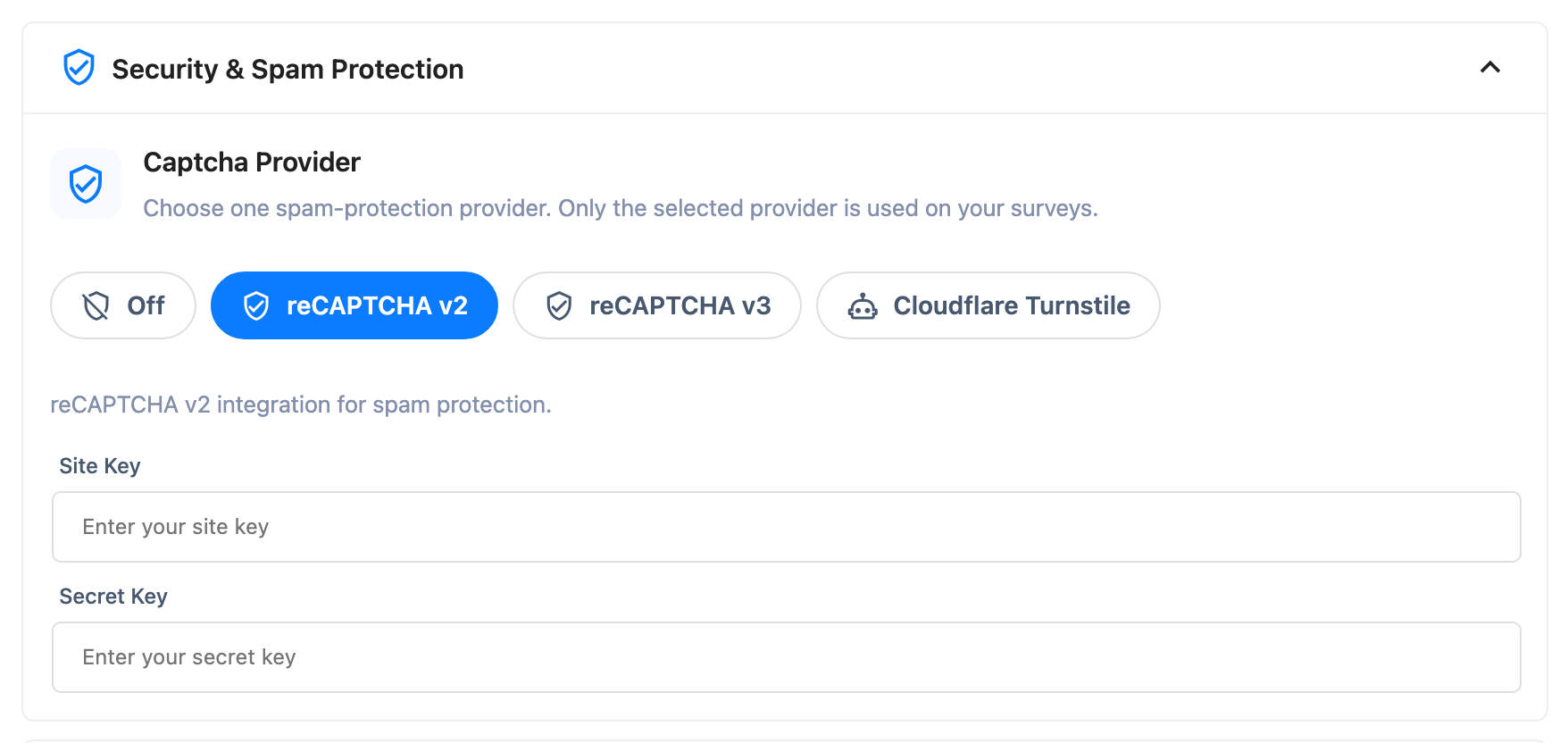
These fields save automatically a few seconds after you stop typing — there's no Save button on this screen.
Providers
| Provider | Edition | What a respondent sees |
|---|---|---|
| Off | Free+Pro | Nothing — no check runs |
| reCAPTCHA v2 | Free+Pro | The "I'm not a robot" checkbox, and sometimes an image challenge |
| reCAPTCHA v3 | Pro only | Nothing visible — it runs in the background and scores the visit |
| Cloudflare Turnstile | Pro only | A brief, non-interactive check |
Free is limited to reCAPTCHA v2, and it's enforced
Unlike most of the per-survey Pro locks in this product, this one isn't just a hidden field in the UI. Free's server checks the stored provider at the moment it verifies a respondent, and reCAPTCHA v2 is the only one it recognizes. If Captcha Provider is set to reCAPTCHA v3 or Turnstile — for example, after Pro is deactivated — free doesn't fall back to v2 on its own. It treats every survey as having no spam check at all, until you open Security & Spam Protection and set the provider back to reCAPTCHA v2 or Off yourself.
When the check runs, and what happens on failure
The check runs once: the moment a respondent's first request for the survey creates their session, not on every answer and not at final submission. A no-op when no provider is configured. If it fails, the respondent never gets past that first moment:
- An empty or missing token: "Please complete the captcha challenge."
- A token that fails verification: "Captcha verification failed. Please try again."
Either message blocks the session from being created — the respondent can't start the survey at all, not just submit it.
What respondents see
On a survey with spam protection on, this is the first thing a respondent meets, before the cover screen and before question one. Set Captcha Provider to Off and they see nothing added at all.
Troubleshooting
I downgraded from Pro and now nothing is checking respondents. If Captcha Provider was set to reCAPTCHA v3 or Turnstile, free doesn't fall back to reCAPTCHA v2 automatically. Open Security & Spam Protection and pick reCAPTCHA v2 or Off yourself.
Respondents say a survey won't even load. A failed captcha blocks session creation outright. Check that the Site Key and Secret Key match the domain you registered them for.
reCAPTCHA v3 blocks real visitors, or blocks nobody at all. Check the score threshold. It defaults to 0.5 and is clamped between 0.0 and 1.0 — a threshold of 0 passes all traffic.
I can't find a captcha toggle on one specific survey. There isn't one. This screen is the only place spam protection is configured, and it applies to every survey at once.