Open an individual response
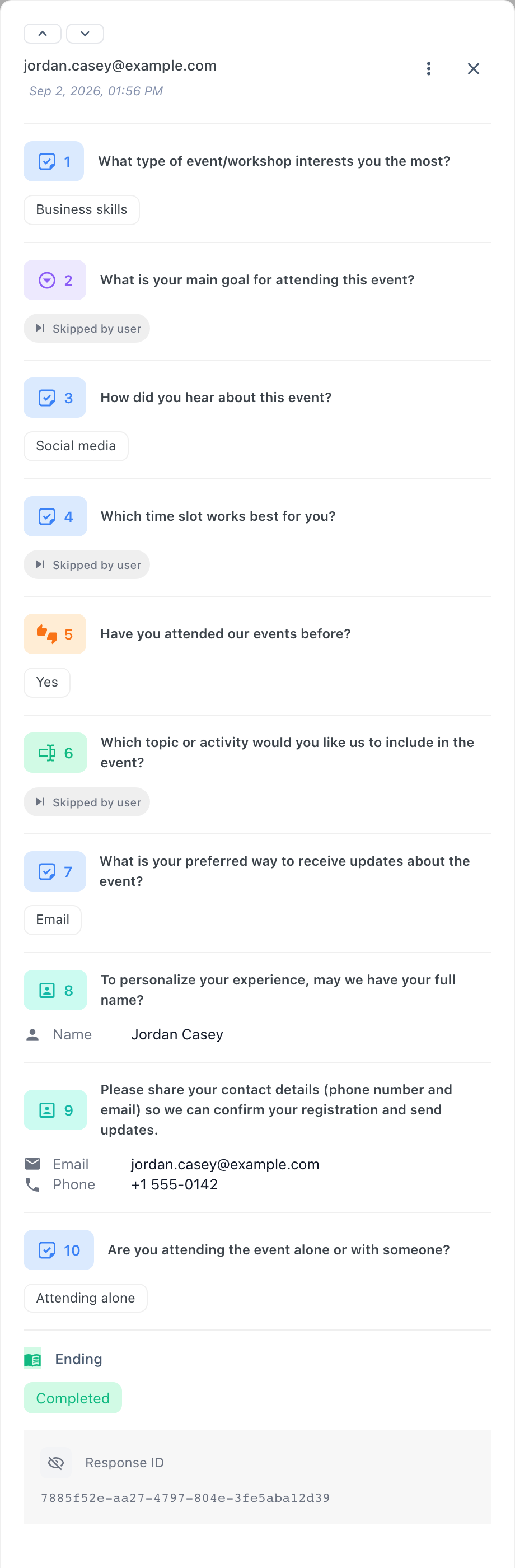
The Responses tab lists one row per respondent's session — not only the ones that finished. Opening a row shows everything SurveyX recorded for that session: every answer, the respondent's profile, and how it ended. It needs Pro.
The Responses tab needs an active Pro licence. See pricing.
Status
| Shown as | Session state | What happened |
|---|---|---|
| Completed | completed | The respondent reached the end of the survey. This is what these docs call a response. |
| In Progress | active | The respondent has started answering but hasn't finished, and hasn't gone quiet long enough to count as dropped off. |
| Drop off | dropped_off, or an active session idle more than 10 minutes | Abandoned partway through. SurveyX relabels a stalled "In Progress" session as Drop off as soon as you load the table — it doesn't wait for its own hourly cleanup to catch up. |
| Expired | expired | The survey was edited and republished after this session began, so its questions no longer match what the respondent originally saw. |
Every status besides Completed is a partial: SurveyX keeps whatever answers it collected, and those answers are still counted in the per-question numbers on the Summary tab — the session never counts as a response.
What each answer shows
| Question type | Shown as |
|---|---|
| Choice types (multiple choice, multi-select, dropdown, yes/no, image choice) | The chosen option's title, plus its thumbnail for image choice |
| Matrix / Likert | The selected column label for each row |
| Opinion scale | "Score: N" |
| Rating | "Rating: N" |
| Date | Formatted as M/D/YYYY |
| Contact info | Name, email, phone, and company, listed separately |
| Text input | The text as typed |
| File upload | The file name plus a download link — see below |
When a question has no answer, SurveyX shows why:
| Shown as | What happened |
|---|---|
| Skipped by user | The question was optional and the respondent left it blank. |
| Skipped by skip logic | Skip logic sent the respondent past this question. |
| Not available | The survey changed after this respondent started, so the question no longer matches what they originally saw. |
| Not reached | Their session ended before they got to this question. |
Uploaded files
A file-upload answer shows the file's name and a download link. SurveyX doesn't preview the file inline. That link is a public URL — see who else can reach it.
The respondent profile
Name, email, and phone shown on a response come from the respondent's profile, not from that one session — SurveyX joins them in from a separate table. Contact info is the only question type that fills that profile; add one if you want to see who answered.
What SurveyX doesn't collect
SurveyX doesn't collect a respondent's IP address or browser (user agent) at all. Location is the
only one of the three ever written, and only if you've hooked surveyx_get_location yourself to
supply a geolocation provider — SurveyX ships without one. Even then, no screen in the admin shows
it: not the Responses table, the response drawer, or either CSV export. See data and
privacy for what
happens to values an older build already stored.
Trivia scores and personality results aren't stored anywhere a response can show them, either. Scoring and result classification happen only in the respondent's browser while they take the survey; nothing gets written back to the response. If you need to know how someone scored, you won't find it here.
Deleting a response
Deleting a response removes it and its session immediately — there's no undo and no trash. Do this only when you're sure.
What respondents see when they resume
A respondent returning to a session that's In Progress or Drop off picks up exactly where they left off, on the question they were on, with their previous answers still filled in. The only way they start over is Start Again, which deletes every answer already recorded for that session before restarting it — permanently, the moment they choose it.
Troubleshooting
A response shows no name, email, or phone. The survey doesn't have a contact-info question, or the respondent left those fields blank — nothing else populates the profile.
I can't find a respondent's location or IP address. SurveyX doesn't collect a respondent's IP
address or browser details at all. Location is recorded only if you've wired up your own
surveyx_get_location provider, and even then it isn't shown anywhere in the admin.
A quiz's score, or a personality result, doesn't show up on the response. It never does — scoring and result classification aren't saved anywhere the admin can read.
A session shows Drop off, but the respondent might come back. They still can — Drop off doesn't close the session. If they return, they resume from where they stopped.