Share your survey with its own page
Every survey you activate already has its own page at a real URL, with its own title, description and social-preview tags — you don't publish it anywhere separately. Use this page when you want a direct link to share, rather than embedding the survey inside an existing page on your site.
Prerequisites
- The survey's status is Active. A draft (Inactive) survey has no page yet.
Find the link
- Open the SurveyX dashboard and locate the survey's row.
- Click View page in the Actions column. This action only appears once the survey is Active.
The URL follows the pattern /{base}/{survey_id}/{slug}/ — for example /survey/42/customer-satisfaction/.
The base segment (survey by default) and the slug both come from your site, not from a setting you
type per survey.

Change the URL base
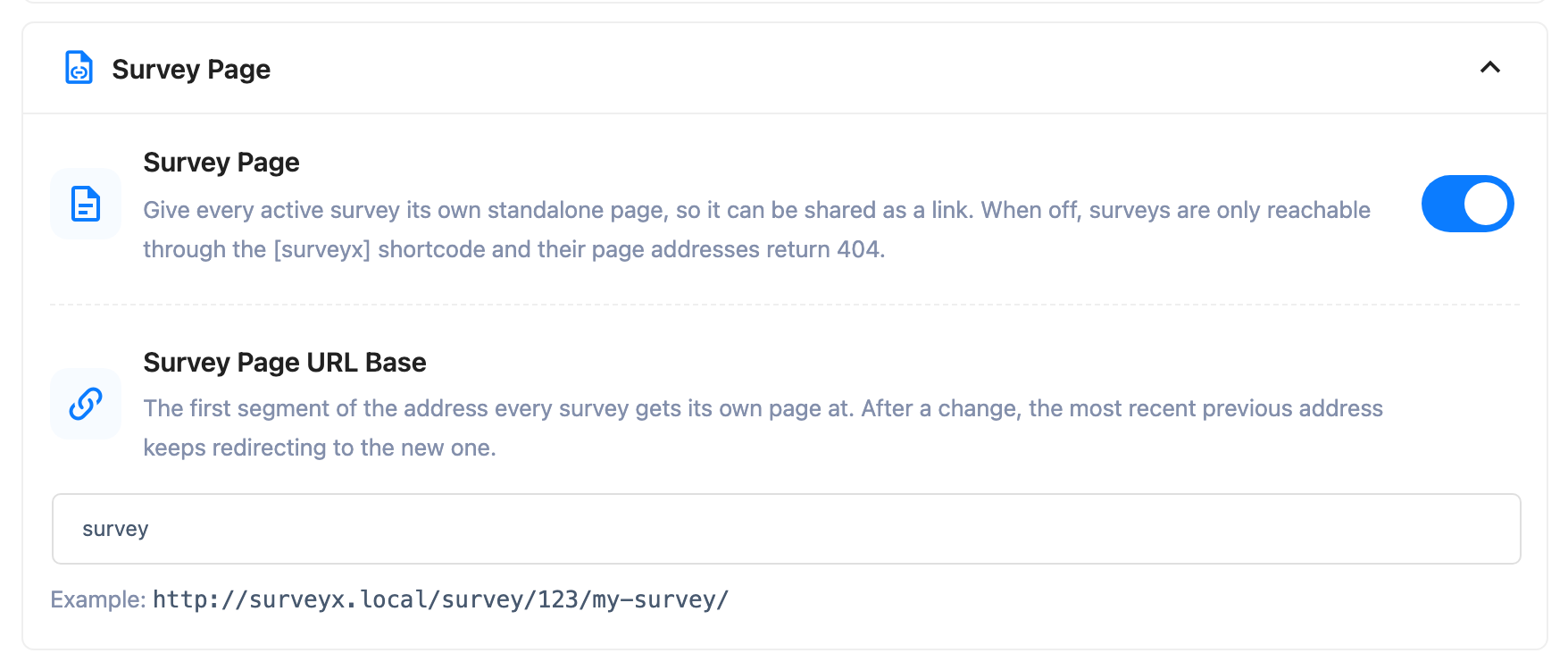
- Open Settings in the SurveyX admin menu, and open the Survey Page section.
- In Survey Page URL Base, change the field (
surveyby default) to whatever segment you want every survey page to sit under.
A handful of WordPress-reserved words — wp-admin, wp-json, wp-content, wp-includes, feed,
author, category, tag, page, comments — are blocked; picking one of them, or leaving the
field empty, silently falls back to survey instead of showing an error.
Changing the base doesn't break links you already shared. SurveyX keeps the previous base redirecting to the new one, so a bookmarked or indexed URL under the old base still resolves.
Turn survey pages off
You can turn pages off for the whole site, or for one survey at a time.
- Site-wide: in Settings, open Survey Page and turn its toggle off. With it off, every survey is reachable only through the shortcode — visiting a survey's page URL returns a 404.
- Per survey: on the survey's General tab, use the Survey Page URL control. It's three buttons: Default (Enabled) (the button reads Default (Disabled) instead when the site-wide toggle is off), Always on, and Shortcode only. Default follows the site-wide switch above; the other two override it for this survey only. An unrecognized value falls back to Default rather than silently hiding the page.
What respondents see
The page renders your survey using its own theme and cover layout — including Image left, Image right and Full screen covers, which only appear here and never on a shortcode embed. See Set your survey's title and cover.
Shared on social media or search, the page carries:
- A page
<title>and meta description, built from the cover text you wrote (capped at 155 characters). - A canonical link.
- Open Graph and Twitter Card tags, with
og:imageand a large Twitter card image if the survey has a cover image, or a smaller card if it doesn't.
On the free plugin, survey pages are always noindex,nofollow — search engines are told not to
index them. Pro adds two settings, both on the survey's General tab: Allow Search Engines to
Index the Survey Page, and Redirect After Submit, which sends the respondent to a URL of your
choice once they finish instead of showing your Closing screen. See
pricing.
Turning indexing on isn't enough by itself — three things all have to be true, or the page stays
noindex,nofollow regardless of the switch: the setting itself is on, your site's permalinks are
set to a pretty structure (not the default ?p=123), and this isn't a page WordPress is treating as
an error/notice page.
The redirect doesn't always fire. A quiz's score screen and a personality survey's result screen both take priority over the redirect — the redirect only applies when the respondent would otherwise land on your plain Closing screen. If your survey shows a result or score, set expectations accordingly rather than assuming every completion redirects.
Troubleshooting
The page 404s even though the survey is Active. Check three things in order: the site-wide survey-page switch in Settings, this survey's own page setting on its General tab (it may be set to shortcode-only), and — on Pro — that your licence is active. An inactive or expired Pro licence takes the page down for every visitor, even you.
I changed the base and worry old links broke. They didn't — SurveyX keeps the previous base working as a redirect. See the tip above.
My base setting didn't save the way I typed it. You likely typed a reserved word (page,
feed, author, and the others listed above) or left it empty; both silently fall back to
survey.
Search engines still aren't indexing a Pro survey page. Recheck all three conditions above —
the indexing switch, pretty permalinks, and that the page isn't otherwise flagged as an
error/notice page. Any one of them failing forces noindex,nofollow.
The post-submit redirect isn't firing. If the survey is a quiz or a personality test, its score or result screen is showing instead — that always wins over the redirect. The redirect only applies to a plain Closing screen.