Send completed responses to your own endpoint
A webhook sends a signed HTTP POST to your own URL every time a response is completed, with every answer in the body. Use it to feed Zapier, a data warehouse, or your own backend.
Webhooks need an active Pro licence. See pricing.
What triggers it
Webhooks are configured per survey, and one survey can have several endpoints. The only event is
session_completed — there's no event for a partial response, a single answer, or a survey being
published. Write your integration around every completed response, not every response.
Add an endpoint
You'll need an https URL that can accept a POST request. Open the survey's General tab, and in
the Integrations card click Set up integrations (or Manage integrations once you've
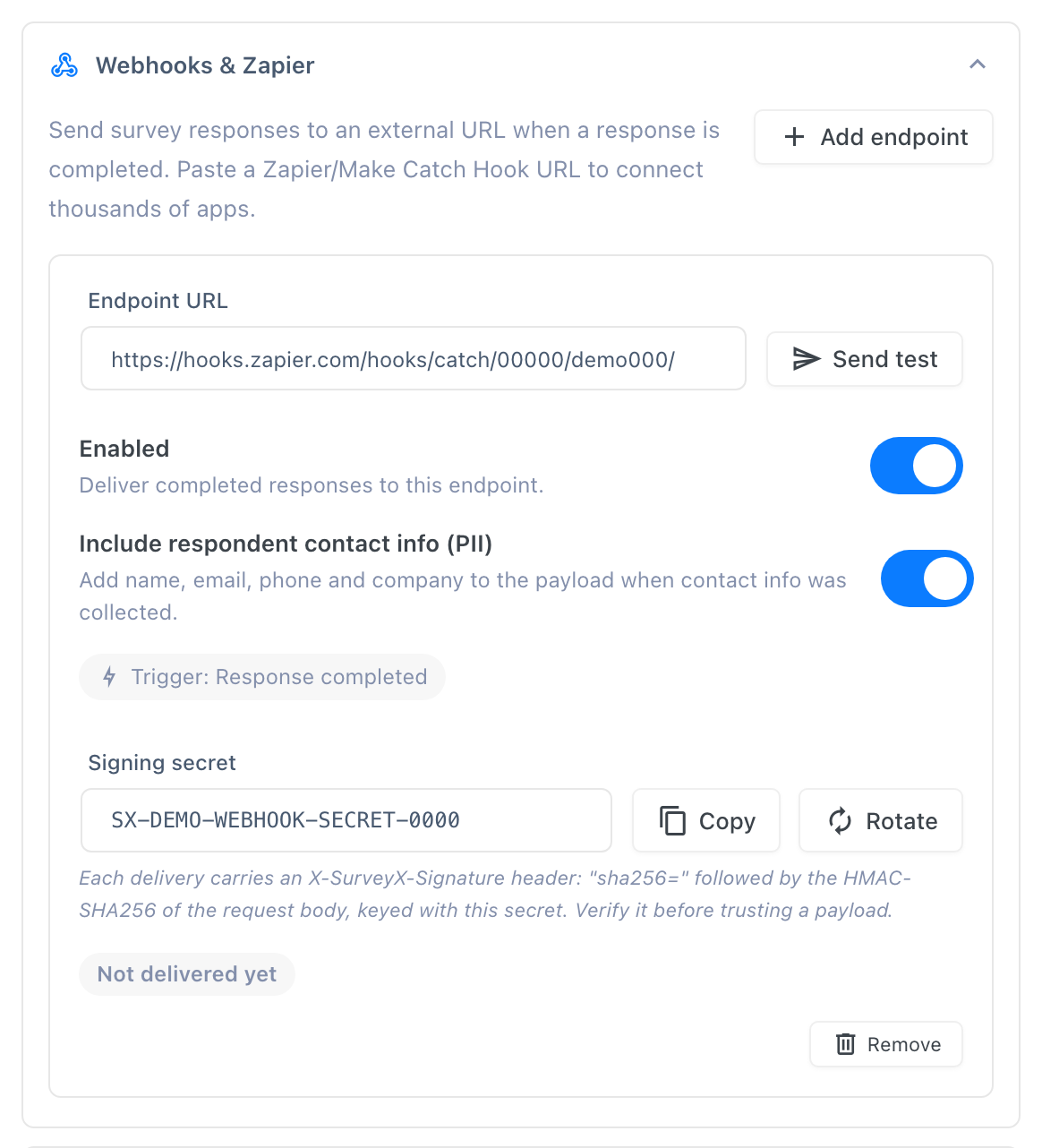
added one). In the Webhooks & Zapier section, click Add endpoint and paste the URL into
Endpoint URL. SurveyX checks the URL twice — once when you save it, again at delivery time —
and enforces two rules: it must be https, and it must not resolve to a private, loopback, or
otherwise reserved address. A URL that fails either check is saved with the endpoint switched off,
not silently dropped.
SurveyX generates the signing secret itself the first time you save the endpoint — you never type one in. Once it's generated, it appears in a read-only Signing secret field with a Copy button beside it and a Rotate button to replace it. Copy it now if you're about to set up the receiving end — you'll need it for the signature check below.
Turn on Include respondent contact info (PII) if you also want the respondent's name, email, phone, and company in the payload. It's off by default, and it only adds that data if the respondent actually gave it.
Use Send test to fire a sample payload at your endpoint immediately and see the HTTP status code it returned.
Payload
{
"event": "session_completed",
"schema_version": 1,
"survey": {
"id": 123,
"title": "Customer feedback",
"type": "survey"
},
"session": {
"id": 456,
"respondent_id": 789,
"started_at": "2026-09-14T10:00:00Z",
"completed_at": "2026-09-14T10:04:32Z",
"score": null,
"total": 12
},
"answers": [
{
"question_id": 1,
"question_title": "How did you hear about us?",
"type": "multiple_choice",
"answer": ["Search engine"]
}
],
"respondent": {
"name": "Jane Doe",
"phone": "555-0100",
"company": "Acme Inc"
}
}
score is non-null only for a Knowledge Quiz survey; every other survey type sends it as null.
total is always the survey's question count as an integer — it's never null. The respondent
object is present only when the endpoint's PII toggle is on and the respondent actually supplied
that data — expect it missing most of the time.
Headers
| Header | Value |
|---|---|
X-SurveyX-Signature | sha256=<hex-encoded HMAC-SHA256 of the raw JSON body, using your endpoint's secret> |
X-SurveyX-Event | session_completed |
X-SurveyX-Delivery | {webhook_id}:{session_id} — unique per delivery |
To verify a request, compute HMAC-SHA256(raw_body, your_secret), hex-encode it, and compare it to
the value after sha256= in X-SurveyX-Signature. Use the exact raw request body, before any JSON
re-parsing — re-serializing the payload can reorder keys or change whitespace and break the
comparison.
As covered above, click Copy next to Signing secret to get the value for this check. Click Rotate to replace it — the field clears and shows A new secret is generated when this survey is saved until you actually save the survey, which is when the new value takes effect. SurveyX keeps only the current secret, so rotating discards the old one outright: update your receiving server with the new value at the same time you save, or every signature it checks from that point on will fail.
Delivery behavior
| Property | Value |
|---|---|
| Timeout | 5 seconds |
| Attempts | 3 total |
| Backoff | 60 seconds after attempt 1, 300 seconds after attempt 2 |
| Status values | success, retrying, failed, blocked |
Delivery is queued in the background, so a respondent's submission never waits on your endpoint responding. Each endpoint card shows a Trigger: Response completed badge and its own status chip: Not delivered yet before the first attempt, then Blocked (the URL failed the https/private-range check), Failed (all three attempts sent, none succeeded), Retrying (an attempt failed and a backoff is in progress), or Delivered.
Switch an endpoint off without deleting it using its Enabled toggle, or remove it entirely with Remove.
What respondents see: nothing. Webhooks are entirely server-to-server.
Troubleshooting
Status shows blocked. The URL isn't https, or it resolves to a private, loopback, or
reserved address. Fix the URL and save the endpoint again — SurveyX re-checks it both when you
save and when it delivers.
Status shows failed. Your endpoint didn't return a success response within 5 seconds across
all 3 attempts. Check your endpoint's own logs for what it received, or use Send test to
trigger a fresh attempt and see the status code directly.
Signature doesn't match on my end. Verify against the raw request body your server received, not a re-serialized copy of the parsed JSON — differences in key order or whitespace produce a different HMAC. If the endpoint's secret was rotated recently, confirm your server picked up the new value from the Signing secret field — the old one stops verifying as soon as the survey is saved.
I need every response, not just completed ones. Not available. session_completed is the only
event a webhook can fire on.