Get notified when someone completes your survey
SurveyX can email you as soon as someone finishes a survey. It's a heads-up, not a report: the email tells you a response came in, not what was answered.
Email notifications need an active Pro licence. See pricing.
What triggers it
The email fires only when a respondent finishes the whole survey, never on a partial response, and only once per completion — reopening an already-completed response doesn't send it again. Sending is queued on WordPress's own cron rather than sent the instant they submit, so a respondent's browser never waits on it. On a site that gets regular traffic that's usually a minute or two; on a quiet site it can take longer, since WP-Cron only runs when something visits the site.
Settings
Global, not per survey: it lives under Settings, in the Notifications group.
| Setting | What it does | Default | Edition |
|---|---|---|---|
| Email Notifications (toggle) | Turns notifications on or off | Off | Pro |
| Email Address | Where the notification is sent | Falls back to your WordPress admin email if left blank | Pro |
| Subject | Author-written text, with @ mentions for merge values | "New Survey Response" | Pro |
| Title | Author-written text, with @ mentions for merge values | "Survey Completed" | Pro |
| Message | Author-written text, with @ mentions for merge values | "A respondent has completed your survey.\n\nYou can view detailed responses in your WordPress admin panel." | Pro |
There's one recipient: a single address, not a list, with no CC or BCC field. To reach more than one person, forward the email or point the address at a distribution list you manage outside SurveyX.
What the email contains
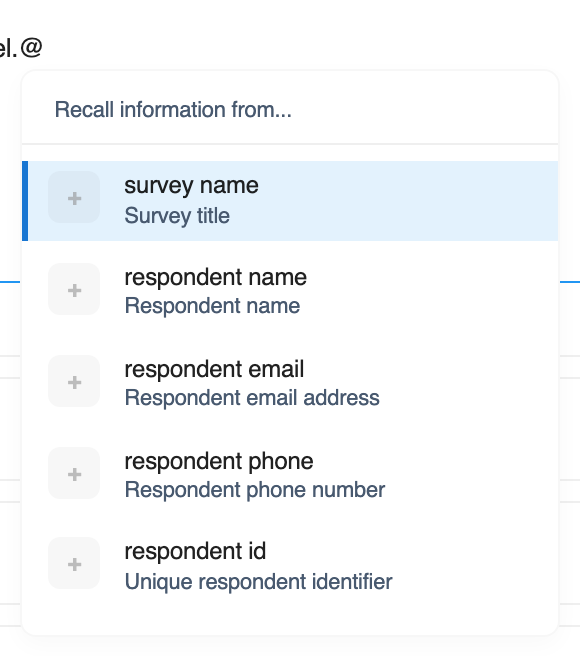
Type @ in the subject, title, or message to insert one of five values: survey name, respondent
name, respondent email, respondent phone, and respondent id. That's the entire merge set — the
email carries no answers. If you need to see what someone answered, open the response in your
WordPress dashboard; the default message text says exactly that.
What respondents see: nothing. There's no respondent-facing confirmation or autoresponder — this notification goes to you only.
Troubleshooting
Not receiving email. Check, in order: notifications are turned on; the recipient address isn't
blank or misspelled (a blank field falls back to your WordPress admin email, so confirm that
address too); the survey was actually completed rather than just started, since a partial response
never sends anything; and your WordPress site can send mail at all — test with any other plugin
that emails you, since SurveyX sends through the same wp_mail() path everyone else does.
The email took a while to arrive, or arrived at an uneven delay. Expected: sending runs on WordPress's own cron, which only fires on an incoming site visit rather than on a fixed timer, so the delay tracks your site's traffic rather than the time since the response completed.
I want the email to include the answers. Not available. The merge set is fixed to survey name and respondent name, email, phone, and id. For the answers, use a webhook instead — its payload includes every answer.